Thanks for visiting my website!
The CORE Operating System Micro Course
Capture - Organize - Repurpose - Execute
June 8, 2026
If your business currently lives across sticky notes, screenshots, browser tabs, random Google Docs, half-finished Canva designs, voice notes, and “I swear I wrote that down somewhere”… welcome. You are not alone.
Most creators are not struggling because they lack ideas, they are struggling because they lack systems.
They have too much information floating around with nowhere reliable to store it, organize it, retrieve it, or turn it into repeatable content. As a result, they constantly feel behind, overwhelmed, reactive, and mentally exhausted.
One of the biggest myths in online business is that successful creators are somehow naturally organized, disciplined, or endlessly motivated. If only, right? In reality, most successful creators simply build systems that reduce friction.
They stop relying on memory and recreating work from scratch. They stop operating from chaos, and that's what this course is about. We're going to build you a Creator Operating System (we'll call it CreatorOS from now on) that supports your creativity instead of draining it.
Because your brain was never meant to store your entire business.
The CORE Framework
Throughout this course, you’ll build your CreatorOS using the CORE Framework:
C — Capture
Stop losing ideas.
O — Organize
Create structure that reduces inefficiencies and overwhelm.
R — Repurpose
Turn one idea into multiple assets.
E — Execute
Build repeatable workflows and sustainable consistency.
This framework will become the foundation of how you manage your content, ideas, projects, digital assets, workflows, and long-term growth. By the end of this course, you’ll have a systemized content ecosystem that feels calmer, clearer, more intentional, and dramatically easier to maintain.
Module 1: The Scattered Creator Problem
Before we can build systems, we need to understand why creators become overwhelmed in the first place. Most creators assume the problem is laziness, lack of discipline, or poor time management.
Usually, it’s none of those things. The real problem is unmanaged information, because we modern creators consume and create massive amounts of information every day in the form of:
ideas
trends
screenshots
captions
blog drafts
hooks
videos
affiliate links
emails
prompts
analytics
graphics
products
notes
Without a reliable system, your brain starts trying to hold all of it at once, and that creates cognitive overload. The result is mental clutter, unfinished projects, decision fatigue, inconsistency, and exhaustion.
This module helps you identify where chaos is currently costing you time, energy, and momentum.
Lesson 1
Why Your Brain Feels Full All the Time
Your brain is designed to process information — not store an entire digital business. Yet many creators attempt to operate entirely from memory.
They try to remember everything:
future content ideas
passwords
product concepts
unfinished tasks
email topics
affiliate links
launch plans
customer requests
social media ideas
video concepts
Eventually the brain rebels, and this is usually where you start to feel overwhelmed. Psychologists sometimes refer to this as cognitive load, or the total amount of mental effort being used at one time. The more unfinished tasks, unorganized information, and unresolved decisions you carry, the heavier that mental load becomes.
That’s why creators often feel mentally exhausted even when they haven’t technically “done” that much yet. Their brain is running dozens of background tabs simultaneously.
A creator operating system reduces cognitive load by giving information a reliable home. Instead of trying to mentally juggle everything, you externalize it into systems. This creates mental clarity, reduced stress, improved focus, faster execution, better consistency, and best of all, relief.
Lesson 2
The Hidden Cost of Creator Chaos
Creator chaos costs far more than most people realize, and it doesn’t just create clutter - it creates friction. And friction quietly destroys momentum.
Does any of this creator chaos look like your world?
rewriting content because you can’t find the original
duplicate ideas
forgotten affiliate opportunities
unfinished lead magnets
inconsistent posting
scattered workflows
abandoned products
missed deadlines
losing valuable inspiration
wasting time searching for files
Every tiny moment of friction drains energy. When content creation feels hard every day, consistency becomes difficult. This is why many creators constantly feel “busy” but not productive: they're spending enormous amounts of energy managing disorganization instead of creating.
Systemization, however, removes much of that friction, because when your ideas, workflows, and assets are organized, then your content becomes easier to create. You make decisions more quickly, your workflows are repeatable, and your creativity flows more freely.
Structure supports creativity. It doesn't limit it.
Lesson 3
The Open Loops Problem
One of the biggest sources of overwhelm is something called open loops.
An open loop is anything unfinished that your brain continues tracking in the background. Some examples might be an unfinished ebook, social media posts you haven't gotten to, organizing your Canva graphics, trying to find that awesome idea you had for a workshop, that landing page that you need to tweak, or where you saved the affiliate link for the course you really wanted to promote. All those unfinished ideas swirling around in your poor brain, which treats them like active browser tabs.
The more open loops you have, the harder it becomes to focus. We're not overwhelmed because we're doing too much. We're overwhelmed because we're mentally carrying too much.
Systems, though, help close open loops. Not because every task is finished instantly, but because your brain trusts that the information exists somewhere safe and retrievable. That trust changes everything because you can stop feeling like you "must remember everything" at all times.
Lesson 4
Your Chaos Audit
Now it’s time to identify where your current creator ecosystem feels scattered. No judgment here, either - this is simply about awareness. The truth is that I've lived on chaos and caffeine at times in my life, and I know it's no fun. Ask yourself:
Content Chaos
Do I struggle to find old content?
Do I recreate work unnecessarily?
Do I lose ideas regularly?
Do I have unfinished drafts everywhere?
Workflow Chaos
Do I create content reactively?
Do I constantly switch tasks?
Do I lack repeatable workflows?
Do I feel behind most of the time?
Digital Clutter
Is my desktop cluttered?
Are my files poorly named?
Is my Google Drive disorganized?
Is my Canva workspace messy?
Do I have PLR that I've purchased - and never even looked at?
Mental Overload
Do I feel mentally exhausted often?
Do I struggle focusing?
Am I constantly flitting from one task to another, and never really finishing any?
Do I constantly think about unfinished tasks?
Do I feel scattered throughout the day?
Consistency Problems
Do I post inconsistently?
Do I struggle finishing projects?
Do I overcomplicate content creation?
Do I rely too heavily on motivation?
The goal of this audit is simple: Identify where systems are missing. Every area of chaos can eventually become a system!
Module 1 Wrap-Up
In this module, you learned:
why creator overwhelm happens
how cognitive overload impacts consistency
the hidden costs of digital chaos
why open loops drain mental energy
where your current systems are breaking down
Most importantly, you learned that you aren't failing because you lack talent, intelligence, or motivation. You're overwhelmed because your business currently has nowhere structured to live, and that changes starting now.
In the next module, we’ll begin building the first layer of your CreatorOS: CAPTURE. You’ll learn how to stop losing ideas, organize incoming information, and create a reliable Creator Inbox system that reduces mental clutter immediately.
Module 2: CAPTURE: Build Your Creator Inbox
Ideas are everywhere. They pop into our head when we're least expecting them, but least able to write them down. This could be while driving, in the shower, halfway through another project, while scrolling social media, during conversations, while watching YouTube, or at 2:17 AM when your brain suddenly decides NOW is the perfect time to invent an entire business model
So the problem is not a lack of ideas, it's the fact that most of us don't have a reliable system for capturing them.
As a result, we lose them. Inspiration, gone. Content, unusable. Mental clutter, increase. And we feel like we're constantly starting over. We think, "Next week, I'll create a system for content planning/creating/scheduling/repurposing." And the cycle goes on repeat.
This module is about building a trusted capture system. Your goal is simple, and that is to stop forcing your brain to act as storage. Instead, you’ll create a Creator Inbox — a centralized system for collecting:
ideas
inspiration
hooks
content concepts
prompts
links
screenshots
affiliate opportunities
notes
voice memos
unfinished thoughts
Think of this as building the front door to your CreatorOS, and I'm going to help you build it.
Everything enters the CreatorOS first.
Lesson 1
Never Lose a Good Idea Again
Most creators underestimate how many valuable ideas they lose every week. You have a great idea for a blog topic, and you think, "I'll write that down as soon as I'm done with this post." Then - POOF. It's gone. Then a perfect Instagram caption vanishes. A great product idea evaporates before it’s written down. A brilliant hook gets forgotten by morning.
Over time, creators begin believing they “aren’t creative anymore,” when in reality, they simply lack a reliable capture process. This is exactly why you created a "Repurpose Candidates" category back in your Creator Inbox. Every time you tagged a piece of content with repurpose potential, you were already building the raw material for this module. Now we're going to put it to work.
Creativity is often less about generating ideas and more about preserving them long enough to use them. This is why capture matters so much. Your capture system should be fast, simple, friction-free, and most importantly, accessible everywhere.
If capturing an idea takes too many steps, you won’t do it consistently.
The best systems are often boringly simple. Your goal for your capture system is to get ideas out of your brain quickly and into your trusted system. Once your brain believes information has been safely stored, it can relax.
Mental clutter decreases because your brain no longer feels responsible for remembering everything itself.
Lesson 2
Your Capture Ecosystem
Most creators accidentally create fragmented capture systems. Meaning, they use parts of many different systems: they jot down ideas in a Notes app, take
screenshots on their phone, leave voice notes in random folders, create a zillion bookmarks in browser chaos, leave unfinished drafts in Google Docs, and write hooks on sticky notes and wallpaper their office with them. Even if you're one of those who says, "Oh, I know it looks disorganized, but I know where everything is;" this creates digital scattering.
Instead, try using one connected ecosystem, your Creator Inbox. This will become your central collection point, the point to which everything eventually funnels.
Your ecosystem might include:
phone notes
Notion databases
Google Docs
voice memo apps
screenshot folders
email forwarding
bookmark tools
AI chats
browser extensions
The specific tools matter less than consistency, because a simple system used consistently beats a complicated system used occasionally.
Your capture ecosystem should answer one question: “Where does this go?” If the answer is unclear, clutter will grow quickly. Decision fatigue (yes, that's a thing) increases when every new piece of information requires a brand-new decision.
The reason I like systems so much is that they reduce decision-making, and that saves energy and time.
Lesson 3
Mobile Capture Workflows
Many of your best ideas will not happen while sitting neatly at your desk; they happen while living your life. That's why safe mobile capture (no writing or typing while driving, please!!) is essential.
You need a way to quickly preserve ideas before they disappear. Here are some simple mobile capture methods:
voice memos
quick notes
screenshot folders
voice-to-text messages to yourself
email forwarding
mobile widgets
bookmark apps
quick-entry Notion buttons
The key is speed, and if you're driving, a hands-free method is essential. If it's too hard to capture your thoughts, you create too much friction, and you'll wind up saying “I’ll organize it later” or “I’ll remember it”. And spoiler alert: you won’t.
One powerful habit is creating a daily capture routine. So for example, take screenshots of content that inspires you. Save content hooks that you want to draw from. Record random thoughts and dictate video ideas when they pop into your head. Save interesting comments or articles that you read. Remember:
you're building a library of future content assets. One random thought today could become a blog article, a lead magnet, a workshop, a product, a course, a viral post, or a YouTube video. Or all of the above.
Creators who consistently capture ideas build enormous creative leverage over time.
Lesson 4
AI as Your Idea Assistant
AI tools can dramatically improve your capture and brainstorming workflows.
Instead of treating AI only as a writing tool, start thinking of it as your assistant. The ways in which AI can help you are limitless: it can function as an organizational assistant, a brainstorming partner, a retrieval system, a categorization tool, a workflow support system. Make sure you tell it that you want straight, no BS information. AI tools are trained to please their users, so you have to get a little tough with it so that it's real with you.
These are just a few areas where AI can assist you:
expand rough ideas
organize scattered notes
generate content angles
sort topics into categories
identify repurposing opportunities
create outlines from voice notes
brainstorm titles and hooks
summarize messy thoughts
rewrite PLR content into your voice
One powerful workflow thought: Instead of waiting until ideas feel “fully developed,” capture messy fragments and let AI help organize them later.
This removes pressure, because then not every idea must arrive perfectly packaged. Your only job initially is preservation. You can refine later.
Another useful tip: If you're a beginner AI user, you'll soon learn how to craft prompts that get the best results. As you do so, create a dedicated “AI Prompt Vault” where you save prompts that consistently produce helpful results. Over time, this will become part of your CreatorOS.
Lesson 5
Creating Your Creator Inbox
Now it’s time to build your actual Creator Inbox, which is your centralized intake system. Think of it like the inbox of a digital office - everything enters here first before being organized later.
Your Creator Inbox may include categories like:
content ideas
hooks
blog topics
video concepts
product ideas
affiliate opportunities
audience pain points
screenshots
inspiration
prompts
quotes
swipe files
Important: The inbox's purpose is information collection, so don't over-organize the inbox itself. The setup shouldn't take hours or give you another reason to procrastinate. You don't need a perfectly color-coded system, 20 databases, or elaborate automations. All you need is something simple, reliable, and consistent. Your Creator Inbox should feel easy to use daily.
Your future organization system will handle sorting and structure later, if you want it to. Right now, the goal is building the habit of capturing instead of mentally carrying. That's a simple shift that can dramatically reduce overwhelm almost immediately.
Creator Inbox Starter Categories
Here are some simple starter categories you can use:
Content Ideas: General future content topics.
Hooks & Headlines: Scroll-stopping openers and titles.
Audience Pain Points: Questions, frustrations, and struggles your audience experiences.
Product Ideas: Course concepts, lead magnets, workshops, offers.
Swipe File: Content examples worth studying.
AI Prompts: Prompts that generate useful outputs consistently.
Affiliate Opportunities: Products, tools, and partnerships to promote later.
Repurpose Candidates: Older content with new potential.
Module 2 Exercise
Build Your Capture Map
Create a simple workflow answering these questions:
Where will I capture:
quick ideas?
screenshots?
voice notes?
links?
AI prompts?
content inspiration?
What tool will serve as my primary Creator Inbox?
How will I process my inbox weekly?
What capture method feels easiest for me?
Remember:
the best system is the one you’ll actually use.
Module 2 Wrap-Up
In this module, you learned:
why creators lose valuable ideas
how capture reduces mental overload
how to build a reliable Creator Inbox
why simple systems outperform complicated ones
how AI can support idea organization
how to create mobile-friendly workflows
Most importantly, you learned that having good ideas isn't enough. You need to capture them so you can turn them into assets that become content, products, income, and opportunities.
In the next module, we’ll move into Organize, where you'll learn how to transform scattered information into a searchable content ecosystem that saves time, reduces stress, and makes content creation dramatically easier.
Module 3: ORGANIZE: Build Your Content Ecosystem
Capturing ideas is only the beginning: If your ideas remain buried inside random notes, scattered folders, screenshots, downloads, and unfinished drafts, you still end up overwhelmed.
Organization is all about retrieval. Its true purpose is simple: Can you quickly find what you need when you need it?
If we're honest, many of us waste enormous amounts of time searching for content ideas and posts, PLR that we downloaded, unfinished drafts, email ideas, hooks, product assets, videos, passwords, research, screenshots...the list goes on and on. This creates friction, frustration, and mental fatigue.
A strong organizational system reduces:
decision fatigue
duplicate work
lost assets
clutter
reactive creation
And increases:
speed
clarity
consistency
scalability
creative momentum
In this module, you’ll build a searchable content ecosystem that supports your creator workflow instead of sabotaging it.
Lesson 1
The Folder Structure That Saves Hours
Most creators organize reactively.
Files end up named:
Final_v2_REALfinal_USETHIS
IMG_8837
Untitled Document
New Canva Design (47)
Eventually, everything becomes difficult to find.
The solution is not creating hundreds of complicated folders.
The solution is building predictable structure.
Your future self should never have to wonder:
“Where would I have saved this?”
Good organization removes guessing.
A simple creator folder structure may include:
Content
Blog Posts
Emails
Videos
Social Media
Pinterest
Podcasts
Products
Courses
Lead Magnets
Workshops
Templates
Sales Pages
Brand Assets
Logos
Photos
Fonts
Graphics
Brand Guidelines
Operations
Affiliate Programs
Analytics
Contracts
SOPs
Planning
Swipe Files
Hooks
Headlines
Emails
CTAs
Ad Examples
Keep structures intuitive and simple because if a system feels difficult to maintain, it probably will not last. Simplicity scales better than complicated.
Lesson 2
Naming Conventions That Actually Work
Naming conventions sound boring.
Until you waste 45 minutes searching for a file you KNOW exists somewhere.
Naming conventions reduce friction dramatically.
Strong file names should answer:
what it is
what platform it belongs to
what category it fits
when it was created
For example, instead of naming your file "Blog Draft," try "2026-05-Healthy-Morning-Habits-Blog."
Instead of: "Video - Final", try "YouTube-ContentBatching-Tutorial-v1."
Instead of: "Canva Design," try "Pinterest-NutrientPairing-Graphic."
The goal is to be able to instantly recognize and find your files. Having to search for something is just time wasted. Consistency matters too - using the same naming scheme will help you remember what you named that one file 6 months ago that you want to repurpose. Again, find it fast, save your time for actual creating. A “good enough” naming system used consistently is incredibly powerful over time.
Lesson 3
Organizing by Content Pillars
One reason creators feel overwhelmed is because all content starts blending together and everything feels random. Content pillars (your major topic categories) can help solve this problem. For example, your pillars might include:
productivity
wellness
affiliate marketing
content creation
healthy aging
AI tools
creator systems
When content is categorized clearly, everything becomes easier: planning, repurposing, brainstorming. Your consistency and productivity improve (and so will your mood!).
You stop asking “What should I create?” because your ecosystem already shows you where opportunities exist. And your content vault becomes searchable by:
pillar
platform
audience pain point
format
monetization opportunity
This transforms your content from random posts into structured assets.
Lesson 4
Build a Searchable Content Vault
Most creators create content once and forget it exists.
That is one of the biggest missed opportunities in online business.
Your old content is not dead.
It is inventory.
A searchable Content Vault allows you to:
retrieve old ideas quickly
repurpose efficiently
identify patterns
reuse successful concepts
avoid duplicate work
monetize older assets
Your vault might track:
blog posts
emails
videos
lead magnets
affiliate promotions
workshops
products
social posts
Important fields may include:
topic
platform
keywords
CTA
status
pillar
repurpose potential
affiliate opportunity
This turns your content into a true business asset library.
Lesson 5
Stop Digital Clutter Before It Starts
Most clutter is delayed decision-making. For example, your downloads start piling up, your screenshots multiply like rabbits, your drafts start collecting dust, and files can get dumped "temporarily" into random locations, likely never to be seen or heard from again.
Over time, your digital environment becomes mentally exhausting. One of the best ways to avoid this is by creating small maintenance habits. For example:
weekly inbox cleanup
deleting duplicates
renaming files immediately
archiving finished projects
sorting screenshots weekly
maintaining one central capture system
Small systems prevent massive cleanup projects later.
Remember, organization is not a one-time event. It's an ongoing relationship with your digital environment with a goal of creating enough structure that your creativity can operate more smoothly.
Module 3 Exercise
Build Your Content Ecosystem Map
Create a simple overview of:
Your Core Content Pillars: What major categories define your brand?
Your Main Content Types: Blogs? Videos? Emails? Pins? Courses?
Your Primary Storage Locations: Google Drive? Notion? Dropbox? Canva? OneDrive?
Your Naming Convention: What consistent structure will you use?
Your Weekly Maintenance Habits: How will you prevent clutter from rebuilding?
Remember: systems fail when maintenance is ignored.
Module 3 Wrap-Up
In this module, you learned:
how organization reduces overwhelm
why retrieval matters more than perfection
how to structure folders and files
how naming conventions save time
how content pillars improve clarity
how to build a searchable Content Vault
how small habits prevent digital clutter
Most importantly, you learned this:
Organization is not about being “naturally organized.”
It is about reducing friction so creating becomes easier.
In the next module, we’ll move into REPURPOSE, where you’ll learn how to transform one idea into multiple content assets, allowing you to create more consistently without constantly starting from scratch.
Module 4
REPURPOSE: The Infinite Content Engine
One of the biggest misconceptions in content creation is the belief that successful creators constantly come up with new ideas. They don't! In fact, many successful creators spend less time creating new content and more time extracting value from content they've already created. This is where repurposing becomes a superpower.
Many creators operate like this: Create → Publish → Forget
Highly effective, systemized creators operate like this: Create → Repurpose → Expand → Monetize → Reuse
As I'm sure you can guess, the difference is enormous. Every blog post, email, workshop, video, podcast, social post, and lead magnet contains multiple opportunities for additional content. When you learn how to repurpose strategically, you stop relying on endless inspiration and start building a content engine.
This module will show you how to transform one idea into dozens of assets, allowing you to create more consistently while reducing workload and content fatigue.
Lesson 1
Stop Creating From Scratch
One of the fastest ways to burn out as a creator is believing every piece of content must be completely new. This creates enormous pressure, because every day becomes a hunt for new ideas, angles, formats, and inspiration. This can become exhausting.
The reality is that your audience rarely sees everything you publish. Sorry, not sorry, just giving you cold hard facts. And even if they do see it, repetition is often beneficial. Why? Because in our 3-second, short attention span world, people need to hear important messages multiple times before they act on them.
So instead of constantly wondering: "What should I create next?" Start asking: "What have I already created that can be expanded, updated, repackaged, or repurposed?"
That single mindset shift can transform your workflow, because now, your existing content library is one of your most valuable business assets.
Lesson 2
The One-to-Many Content Method
At the heart of repurposing is a simple principle:
One Idea → Many Assets
Let's look at an example. Suppose you create a blog article called The Second Brain System Every Content Creator Needs. That single article could become any or all of the following:
Blog Content
Original blog post
Updated version
Expanded guide
Guest article
Email Content
Newsletter
Story-based email
Quick tip email
Product promotion email
Social Content
X posts
LinkedIn posts
Facebook posts
Instagram captions
Threads
Visual Content
Pinterest pins
Infographics
Quote graphics
Carousel posts
Video Content
YouTube tutorial
YouTube Shorts
Reels
Live stream
Product Content
Lead magnet
Mini course
Workshop
Workbook
Template
Notice that the idea stays the same - only the format changes, which dramatically reduces content creation pressure.
Lesson 3
Repurposing Across Platforms
Different platforms require different delivery methods, but they don't require completely different ideas. Many creators make the mistake of treating every platform as a separate content universe, and that creates unnecessary work.
Instead, think about adapting content. For example, consider this scenario: Blog Post (from detailed educational article) to Pinterest (visual summaries) to YouTube (tutorial or discussion) to X (quick posts, insights and observations) to email (include a personal story and lesson) and even to a lead magnet (expanded version with worksheets).
Throughout all these morphs, the core message remains consistent, just the packaging changes. This approach helps build stronger authority because your audience repeatedly encounters your ideas in different formats and locations.
Consistency of message creates recognition, recognition builds trust, and trust supports growth and sales.
Lesson 4
Repurposing for Revenue
Most creators think about repurposing only in terms of content.
The smartest creators also repurpose for monetization.
A single idea can support multiple revenue opportunities.
For example:
A blog post may lead to:
affiliate recommendations
lead magnets
workshops
coaching offers
digital products
memberships
courses
sponsorship opportunities
Let's use a health example.
Suppose you write Nutrient Pairing: Why Some Foods Work Better Together.
That article could become any or all of the following:
a downloadable guide
a workshop
a recipe collection
a challenge
a mini course
an affiliate promotion
a printable chart
a membership bonus
The same concept generates multiple assets and multiple income opportunities.
This is one reason systemized creators often earn more without necessarily creating more content.
They maximize the value of each idea.
Lesson 5
Content Multiplication Workflows
Repurposing becomes much easier when you create repeatable workflows. Instead of reinventing the process every time, you develop a system. For example:
Blog-to-Ecosystem Workflow
Step 1:
Publish blog article.
Step 2:
Extract:
10 social posts
5 Pinterest ideas
3 email angles
1 lead magnet concept
Step 3:
Add everything to your Content Vault.
Step 4:
Schedule future publication.
Step 5:
Track performance.
This turns one content asset into weeks or even months of content.
Another example:
Workshop-to-Course Workflow
Workshop becomes:
workbook
replay
blog series
email series
social posts
lead magnet
mini course
The more workflows you create, the easier content creation becomes.
Eventually, content production feels less like starting over and more like expanding existing assets.
The Content Expansion Formula
Use this simple formula whenever you create something new:
Ask Yourself:
Can I Teach It? Turn it into a video or workshop.
Can I Summarize It? Turn it into social content.
Can I Expand It? Turn it into a guide or course.
Can I Visualize It? Turn it into pins, infographics, or graphics.
Can I Monetize It? Turn it into a product, affiliate opportunity, or offer.
Can I Reuse It? Add it to your Content Vault for future repurposing.
If the answer is yes, you have more content than you think.
Module 4 Exercise: The Content Multiplication Challenge
Choose one existing piece of content.
Examples:
blog post
email
video
workshop
social post
Then create:
5 Social Posts
3 Email Topics
2 Pinterest Pin Ideas
1 Lead Magnet Idea
1 Product Idea
1 Workshop Idea
Start training yourself to see possibilities instead of starting points.
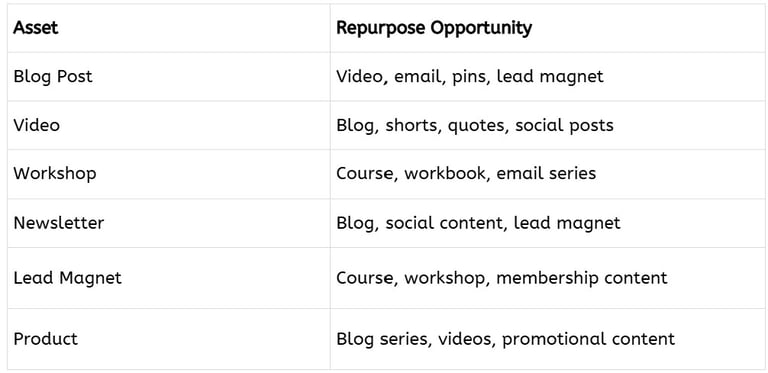
Repurposing Matrix
Every major piece of content should be evaluated using this framework:
Save this matrix inside your CreatorOS Dashboard for easy reference. We'll build your dashboard in module 6.
Module 4 Wrap-Up
In this module, you learned:
why creators burn out from constantly starting over
how to turn one idea into multiple assets
how to repurpose across platforms
how to repurpose for revenue
how to build content multiplication workflows
how to maximize the value of every idea
Most importantly, you learned this:
You do not need more ideas.
You need to extract more value from the ideas you already have.
The most successful creators are rarely creating from scratch.
They are building systems that allow one idea to work harder, travel farther, and generate more impact.
In the next module, we'll move into: EXECUTE, where you'll learn how to build weekly CEO systems that transform your content engine into a sustainable business rhythm, allowing you to stay productive, organized, and consistent without feeling overwhelmed.
Module 5: EXECUTE: Weekly CEO Systems
By this point, you've built three critical parts of your CreatorOS:
Capture: You stopped losing ideas.
Organize: You created a searchable content ecosystem.
Repurpose: You learned how to turn one idea into multiple assets.
Now comes the part that determines whether those systems actually create results.
Execution.
Many creators have great ideas, excellent tools, beautiful planners, templates, and dashboards. But none of those things matter if work never gets completed.
The challenge is that most creators execute reactively. They wake up and ask: "What should I work on today?" That question starts to create decision fatigue (yep, that's a thing) before the day even begins.
Successful creators approach execution differently. They build repeatable systems that reduce decision-making and make consistent action easier. This module will help you create a weekly operating rhythm that supports productivity without burnout.
Consistency is not built through motivation, it's built through systems.
Lesson 1: The Weekly Creator Reset
Most creators spend their week reacting. Emails arrive, new ideas pop up, opportunities emerge, deadlines sneak up. Without a planning system, it feels like you're constantly putting out fires.
The Weekly Creator Reset changes that. Think of it as your business maintenance session.
Instead of asking, "What should I do today?" You start asking, "What matters most this week?"
A Weekly Creator Reset should happen once a week, preferably on the same day. During this session, you review:
Projects: What is currently in progress?
Content: What content needs to be created, scheduled, or promoted?
Products: What products need attention?
Marketing: What visibility activities are most important?
Opportunities: What ideas should be captured for future development?
Priorities: What are the most important outcomes for the coming week?
This simple habit creates clarity before the week begins.
Lesson 2: Time Blocking for Creators
One reason creators struggle with execution is constant context switching. For example, blog writing, email checking, graphic creation, comment responding, training, analytic checking...etc. The constant switching drains energy and focus.
The solution is time blocking, which is assigning specific types of work to specific periods of time. So instead of deciding what to do every hour, you decide in advance:
Monday: Content Creation
Tuesday: Product Development
Wednesday: Marketing & Promotion
Thursday: Content Publication
Friday: Planning & Administration
The exact schedule doesn't matter, of course, just the principle. When your brain knows what type of work belongs in a specific block, focus improves dramatically. Decision fatigue decreases and execution becomes easier. And multi-tasking? Still isn't a thing.
Lesson 3: Batching Without Burnout
Batching, or doing similar tasks together, is one of the most powerful productivity tools available to creators. These might include:
Content Batching: Writing multiple blog posts in one session.
Video Batching: Recording several videos at once.
Email Batching: Writing newsletters for the entire week.
Social Media Batching: Creating multiple posts during one work block.
Design Batching: Creating several graphics in one sitting.
The benefit is momentum, because your brain is able to stay focused on one type of activity rather than constantly shifting gears. However, make sure your batching supports your energy, not exhausts it. What I mean is, don't attempt marathon work sessions just for the sake of batching. Make it sustainable by asking, "How much can I realistically complete while maintaining quality and energy?"
Consistency trumps hustling, always.
Lesson 4: The 3 Keys to Productivity: Simplify • Clarify • Amplify
One of the biggest reasons creators feel overwhelmed is because they continually add new projects without evaluating existing ones.
This has a name: Shiny Object Syndrome — or SOS. And yes, that's intentional. Because when your brain is juggling four half-finished projects and three "brilliant" new ideas, it absolutely is sending out a distress signal. SOS indeed.
So why are so many of us tempted by SOS? Well, every new opportunity sounds exciting. Every new idea feels important. But suddenly, you've got 4 started-but-nowhere-near-finished projects in the works.
This is where the Simplify • Clarify • Amplify framework becomes invaluable.
Simplify: Remove unnecessary complexity. Ask yourself:
What can I eliminate?
What can I automate?
What can I stop doing?
What no longer serves my goals?
Many breakthroughs come from subtraction rather than addition.
Clarify: Identify what matters most. Ask:
What are my top priorities?
What outcomes am I pursuing?
What projects deserve my attention right now?
Clarity reduces overwhelm.
Amplify: Focus on activities that create the biggest results. Ask:
What content performs best?
What products generate revenue?
What systems save the most time?
What efforts create the greatest impact?
Success often comes from doing more of what already works.
Lesson 5: Building Sustainable Momentum
Many creators approach productivity like a sprint, where they work intensely for a few days and then burn out. They disappear for a while, regroup, start over, then rinse and repeat.
Sustainable businesses are built differently because they operate on momentum, which comes from small, repeatable actions performed consistently over time. Instead of asking: "How much can I accomplish today?" Ask: "What can I consistently maintain for the next six months?"
This mindset changes everything, because sustainable systems create sustainable results.
Here are some examples:
One Blog Every Week: For a year = 52 blog posts.
One Video Every Week: For a year = 52 videos.
One Email Every Week: For a year = 52 opportunities to nurture your audience.
One Product Every Quarter: For a year = 4 new assets.
Small actions compound, which turns into consistency, which creates momentum, which fuels growth.
The Creator CEO Mindset
At some point, every creator must make a shift. A hobbyist asks: "What do I feel like doing today?" But a creator CEO asks: "What does the business need most right now?"
This doesn't mean you're abandoning creativity, it means supporting creativity with strategy.
The CEO mindset focuses on:
Systems Over Motivation
Processes Over Perfection
Consistency Over Intensity
Progress Over Busyness
Long-Term Growth Over Short-Term Urgency
This mindset becomes the foundation of sustainable execution.
Module 5 Exercise: Build Your Weekly CEO System
Create a simple weekly framework.
Step 1: Identify Your Three Weekly Priorities
Examples:
Publish one blog article
Create one lead magnet
Record one video
Step 2: Create Your Work Blocks
Examples:
Content creation.
Marketing, audience engagement, networking.
Administration, follow-up, finishing projects.
Step 3: Schedule Your Weekly Reset
Choose the right day, time, and location for this. I usually do this on Sunday night so that I can wake up refreshed and know that I'm ready to hit the ground running on Monday morning. And then I protect this time, because it's one of the most important meetings in my business.
Step 4: Create a Stop-Doing List
Identify:
distractions
low-value tasks
unnecessary commitments
SOS projects
Sometimes productivity improves when you stop doing things, not necessarily when you start doing them.
Weekly Creator Reset Checklist
Every week, make sure you:
Review projects
Process Creator Inbox
Update Content Vault
Plan content
Schedule priorities
Review metrics
Archive completed items
Capture new opportunities
Update CreatorOS
Celebrate progress
Module 5 Wrap-Up
In this module, you learned:
how to create a Weekly Creator Reset
why time blocking improves focus
how batching reduces context switching
how to apply Simplify • Clarify • Amplify
how to build sustainable momentum
how to think like a Creator CEO
Most importantly, you learned that execution is not about working harder, it's about creating systems that make consistent action easier.
When you stop relying on motivation and start relying on structure, productivity becomes more predictable, less stressful, and far more sustainable.
In the final module, you'll bring everything together. You'll combine Capture, Organize, Repurpose, and Execute into a complete CreatorOS and build your personalized roadmap for becoming a truly systemized creator.
Module 6: Build Your CreatorOS
Congratulations! You have now built every major component of your CreatorOS.
Throughout this course, you've learned how to:
Capture - Stop losing ideas and create a trusted Creator Inbox.
Organize - Build a searchable content ecosystem.
Repurpose - Turn one idea into multiple content assets.
Execute - Create sustainable workflows and weekly CEO systems.
Now it's time to connect everything together, because systems are most powerful when they work together. Many creators have pieces of a system. They have a content calendar, folders of content in various completion stages, a few workflows, maybe a notebook full of ideas. The problem is that these pieces often operate independently.
A true CreatorOS connects everything into a single ecosystem. The goal is to create a business that functions smoothly without requiring you to remember everything, manage everything manually, or start from scratch every day.
This module will help you build that ecosystem.
Lesson 1: Your CreatorOS Dashboard
Think of your CreatorOS Dashboard as mission control.
This is where your entire creator ecosystem comes together.
Instead of bouncing between:
notes
spreadsheets
calendars
folders
sticky notes
random documents
You create one central hub. Your dashboard should provide visibility into:
Projects: What are you currently working on?
Content: What is planned, in progress, or published?
Products: What assets are being created, promoted, or updated?
Ideas: What opportunities are waiting in your Creator Inbox?
Priorities: What matters most this week?
Metrics: What results are you tracking?
The dashboard becomes your command center. Every week begins here, every review happens here, and every decision becomes easier because everything is visible.
Remember, the goal is simplicity and clarity, not complexity. Meaning that if your dashboard requires a training manual to understand, it is probably too complicated.
Lesson 2
Build Your Workflow Stack
A workflow stack is simply a collection of repeatable systems. Think of it as your business playbook. Instead of asking: "How do I do this again?", you create documented processes.
Examples include:
Blog Workflow: Idea → Outline → Draft → Edit → Publish → Repurpose
Video Workflow: Idea → Script → Record → Edit → Upload → Promote
Newsletter Workflow: Topic → Draft → Edit → Schedule → Repurpose
Product Workflow: Idea → Validation → Creation → Launch → Promotion
Social Media Workflow: Content → Design → Schedule → Publish → Analyze
Each workflow removes uncertainty. The more repeatable your workflows become, the less mental energy you spend figuring things out. And that newly found energy can be redirected toward creativity, strategy, and growth.
Lesson 3
The Maintenance System
Many creators successfully build systems. Far fewer maintain them. The truth is that every system requires occasional upkeep, because businesses evolve, new products emerge, new content pillars develop, and new tools appear.
Your systems should evolve with your business, which is why maintenance matters. A simple monthly maintenance routine might include:
Content Vault Review: Archive outdated assets.
Folder Cleanup: Remove duplicates and rename files.
Workflow Updates: Improve inefficient processes.
Dashboard Review: Remove clutter and simplify.
Offer Review: Evaluate products, funnels, and promotions.
Goal Alignment: Ensure activities support current priorities.
Maintenance prevents your systems from becoming cluttered and overwhelming.
Remember, your goal is not to build a flawless, rigid system. It's to build one that remains useful by being adaptable and usable.
Lesson 4
Scaling Without Chaos
Growth creates new challenges. And that's a good thing. With growth comes more content, products, customers, opportunities, and complexity. Without systems in place, growth often leads directly to overwhelm. But with a good system, growth becomes manageable.
As your business expands, focus on three principles:
Standardize
Document repeatable processes.
If you do something more than twice, consider creating a workflow.
Simplify
Complexity compounds quickly.
Look for opportunities to eliminate unnecessary steps.
Systemize
Create repeatable solutions instead of temporary fixes.
When a recurring problem appears, ask: "What system would prevent this from happening again?" This mindset shifts you from reacting to problems toward designing solutions.
That is how scalable businesses operate.
Lesson 5
Your 90-Day Systemized Creator Plan
The purpose of this course is to help you create lasting change, and the best way to do that is through implementation.
Over the next 90 days, focus on building habits. You'll have an adjustment period, so I've broken the 90 days into 3 time segments:
Days 1–30: Build the Foundation
Focus on:
Creator Inbox
capture habits
basic organization
content pillars
folder structures
Goal: Create clarity.
Days 31–60: Build the Engine
Focus on:
Content Vault
repurposing workflows
weekly reset process
time blocking
batching
Goal: Create momentum.
Days 61–90: Build the Business
Focus on:
workflow optimization
monetization opportunities
dashboard refinement
scaling systems
long-term planning
Goal: Create sustainability.
The CreatorOS Manifesto
Before we finish, I want to leave you with a few beliefs that guide successful creators. You don't need to remember everything, you need systems. You don't need more ideas, you need better ways to use the ideas you already have.
You don't need to be perfectly organized, you need reliable organization. And you don't need to work harder - you need systems that work harder for you.
Your CreatorOS Blueprint
Your operating system now consists of:
CAPTURE
A trusted Creator Inbox that preserves ideas before they disappear.
ORGANIZE
A searchable Content Vault and structured digital ecosystem.
REPURPOSE
Workflows that transform one idea into multiple assets.
EXECUTE
Weekly CEO systems that create consistency without burnout.
Together, these form the CORE Framework:
C — Capture
O — Organize
R — Repurpose
E — Execute
A simple but powerful system for running your creator business with greater clarity, confidence, and control.
Final Exercise
Design Your Ideal Creator Week
Take a few minutes and answer:
What will I capture?
What will I create?
What will I repurpose?
What will I organize?
What will I complete?
What systems will I maintain?
What matters most right now?
Write your answers down, because these answers become the foundation of your CreatorOS.
Final Thoughts
Many of us spend way too much time and money looking for the perfect tool, the perfect planner, the perfect app, or the perfect productivity hack. What we really need is a simple, reliable system.
The creators who thrive long-term are not necessarily the most talented, they're often simply the most organized. Not because they were born that way, but because they intentionally built systems that support their creativity.
That is exactly what you've started building in this course. Remember: Your business should not live inside your head. Build systems to reduce friction and protect your creativity.
Trust the process, and keep moving forward.
Next Steps
Now that you've completed the course:
Set up your CreatorOS Dashboard
Build your Creator Inbox
Create your Content Vault
Establish your Weekly Creator Reset
Implement your 90-Day Plan
Focus on progress, not perfection
Welcome to the world of the Systemized Creator. Your future self is going to thank you!